

To apply for NEET UG, you will be required to provide neet postcard size photo, inches (10.16×15.24cm). On the NEET exam day, you will also have the photo affixed to the printed version of your application, which is located in the form supplied by NTA with your admit card. In addition to these requirements, if you submit an incorrect format, a blurred image, or a wrong background photo, your application for NEET UG will not be accepted. If you do not complete this correctly, you will likely also have trouble at the time of examination.
What is the size of the NEET postcard?
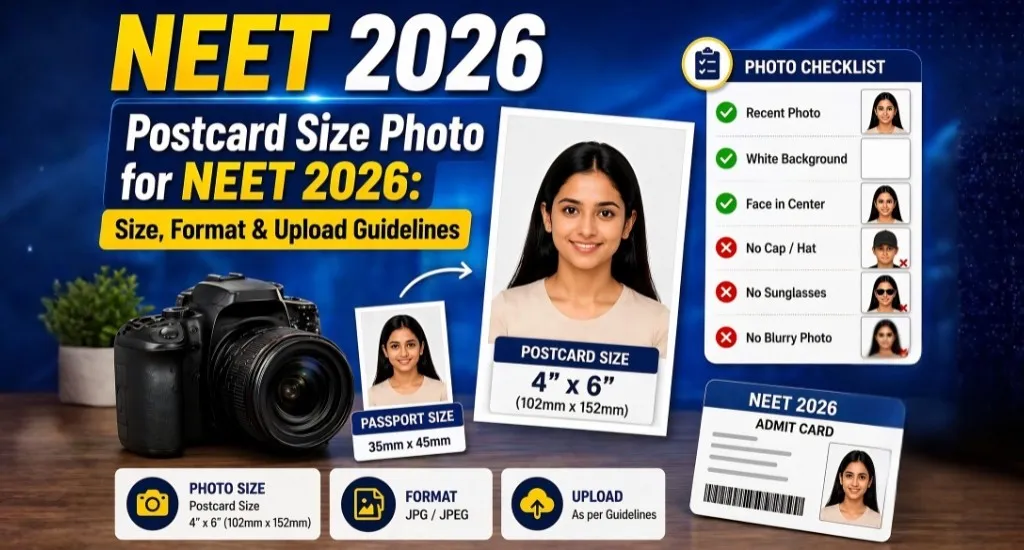
The official size of the photo for NEET UG applications is 4′ wide x 6′ tall (10.16 Cm x 15.24 Cm). These are the dimensions of both the online registration process and the printed proforma submitted to the invigilator.
Differences Between Postcard- and Passport-Size Photos
The differences in size will make them distinct from each other; both types of photographs are needed for your NEET UG application process.
Elements of the NEET Photo
- Your Face – You must have a clear image of yourself and show all areas of your body, such as your head, shoulders, and upper chest.
- Face Size – Your face should occupy at least 70–80% of the photo; it must be of your face, and there should be no expressions, smiles, or exaggerated pictures of yourself.
- Eyewear—You must not be wearing sunglasses, glasses, hats, head coverings, or masks.
NEET Postcard Size Photo Specifications
You must meet the following specifications before getting your photo taken:
- Photo Dimensions
- 4 inches (width) × 6 inches (height)
- Digital File Format Requirements
- File Type: JPG, JPEG (JPG is preferred)
- File Size: 10 KB minimum to 200 KB maximum
- Photo Pixel Resolution: The NTA does not specify a specific pixel resolution, but at 72 DPI for 4 x 6 inch size.
Photo Quality and Appearance
- The image must be of good quality (the photograph was taken with a good camera)
- A plain, bright white background is required
- Clear, sharp photos (not out of focus/smudged)
- No shadows cast over face or background (photo must be evenly lit)
- Must have been taken recently (after January 1, 2026).
Postcard Size Photo vs. Passport Size Photo
There are two types of photos that students must upload for NEET 2026. The two are:
- Passport-Size Photo for NEET (needed for NEET application submission and also must be used with admit card).
- NEET Postcard-size photo (needed for NEET exam day submission).
Below is a summary of some key differences between the two types of photos:
| Feature | Passport Size Photo | Postcard Size Photo |
| Dimension (Approx.) | 3.5 cm × 4.5 cm (about 1.4″ × 1.8″) | 4 inches × 6 inches (10.16 cm × 15.24 cm) |
| File Size (Digital) | 10 KB minimum to 200 KB maximum | 10 KB minimum to 200 KB maximum |
| Photo Format | JPEG or JPG | JPEG or JPG |
| When Used | Application form & admit card | Application form & NTA proforma (exam day) |
Also read – NEET Exam Time 2026: Reporting Time, Duration & Schedule Details
How to Make a Correct NEET Postcard Photo
Follow the steps below to produce a Photo That Meets All NTA Requirements:
Step 1 — Go To a Professional Photographer
Go to a Local Studio and Request a 4×6 image with a White Background Specifically for NEET. Be Sure to Ask for JPG Format Written to a Thumb Drive or WhatsApp, Plus Printed Copies.
Step 2 — Check The Physical Copy
Before leaving the Studio, be Sure the Photo Has the Following Features: White Background, Full Face with Ears Visible, No Shadows, Taken Recently, and Properly Lit.
Step 3 — Online Check of the Digital File
Open The Digital Copy of the Photo on A Computer or Cell Phone to Verify: That the Image Has .jpg or .jpeg file extension, That the File Size Is 10 KB to 200 KB, and That It Is Clear, Not Pixelated.
Step 4 — Resize:
If Required All of The File Size is Too Large, Use A Free Online Tool To Resize Or Reduce It for You, Such As ILoveIMG (i.e. ResizeImage or Compress JPEG).
Step 5 — Place The Digital Postcard With The Passport Sized Photo Side by Side To Compare
The Digital Postcard and Passport Photos Should Look Identical In Terms of Facial Expression, Background Matched Exactly, etc.
Step 6 — Save The Digital Photo With An Easy Access File Name
Save the file with a name like “PostcardPhoto_YourName” So That You Will Be Able To Easily Find It When It Comes Time To Upload Them.
NTA Guidelines for NEET Photo
According to the National Testing Agency (NTA), here are the official rules regarding the NEET Photograph. Please adhere to every point without exception.
- Recency: The photograph must have been taken sometime on or after January 1, 2026. If taken earlier, it is unacceptable.
- Background: The only acceptable background for the photograph is plain white (not off-white, not grey, not cream, and not colored). Coverage: The photograph must contain at least 80 percent of the candidate’s face. Both ears must visibly appear in the picture. No portion of the candidate’s face should be obstructed.
Accessories:
Spectacles: Candidates may wear spectacles that are already a part of their routine; however, they must not be colored or of dark tint, nor should there be any glare or reflection on the spectacles.
Caps & Hats: Not permitted.
- Religious Head Covers: Permitted but must not cover the face.
- Expression: Must be neutral and natural. Eyes must be wide open and clearly visible; address the camera directly (i.e., you cannot have turned your head left or right).
- Digital Editing: The NTA indicates that a digitally edited, altered, or fabricated photograph will be rejected.
- Facial Recognition (New for 2026): The NTA will now use a live photograph during form completion.
- Printing: Although the NTA’s official bulletins do not require pre-printed text on the photo, the recommendation of most sources would be to print both the name of the candidate and photo date on the bottom of the physical photograph. However, the most important factors, according to the NTA’s official bulletin, are clarity and compliance with the required format.
Also read- NEET UG Syllabus 2026: Complete Physics, Chemistry & Biology Topics
How to Upload NEET Postcard Photo
- Log in to the official NTA site (neet.nta.nic.in) using your registered account details.
- Go to your Application Form & look for the Documents section which has the upload option.
- Find the field for uploading your “Postcard Size Photograph”.
- Click on “Browse/Upload” to find your JPEG saved on your computer or device.
- Once you upload the image, there will be a preview of the image. You will want to check to see if the image is clear and oriented correctly and that the entire face can be seen clearly.
- Make sure the file size of the uploaded photo is correct (between ten KB and 200 KB). If you get an error when trying to upload, rescale it and try again.
- Move on to fill out the rest of your Application; do not close out of your web browser or navigate away from the page until the upload has been confirmed.
- After you’ve finished your submission, you will receive a copy of the confirmation page to download and save. Your uploaded photograph is located on that page; please verify once again that it is present.
Common Mistakes Leading to Rejection
These mistakes have caused applicants genuine issues in the past; the following list represents common errors made by students:
- Incorrect dimensions — Uploading a passport-sized image when a postcard-sized picture is required.
- Coloured or patterned background—Images with any type of background that is not plain white.
- An old image—Images taken before January 1, 2026, will not be accepted.
- An edited or modified photo — An image that has been cropped or modified/blurred/tested is also considered as faking your identity.
- The size of- the photos that were uploaded is too large. Each file larger than 200 KB will automatically be rejected by the portal.
- The wrong file format was used—Only jpg/jpeg files will be accepted, while png, heic, and pdf will not be accepted.
- A blurry photo/image—The camera to scan the image is usually not positioned directly above the scanner when taking the image; the photo is taken at an angle to the camera.
- Your face does not match the photo taken live—The photo does not show enough similarity to the one taken at the time of the live capture to trigger a flagged facial recognition check.
- The image is of someone other than you — The act of uploading someone else’s photo will be considered to be submitting unfair means and will result in your application being cancelled.
- Waiting until the last minute — Technical issues experienced with the system/portal are most common with applicants waiting until the deadline.
How Many Copies to Keep
Don’t underestimate how many times you will need your NEET postcard-sized photograph throughout the exam cycle and before:
- Online applications – 1 digital copy to be uploaded
- NEET Proforma on the actual exam day – 1-2 physical copies that will be pasted and submitted
- Counselling – 2-3 physical copies for verification of documents
- College admission—If you got selected: 1-2 copies for college records
- Backup copies – 1-2 additional photocopies
Photo Resize & Troubleshooting Tips
- Problem: The file size is greater than 200 KB. Solution: Use a free online tool such as ILoveIMG.com or CompressJPEG.com; upload the photo and compress it to a desired final size of between 80-180 KB, allowing a margin. Yes, over-compressing will make your image distorted.
- Problem: The photo is too small to view clearly. Solution: Contact your studio and request that your photo be rescanned at a higher resolution before you upload it to their system, keeping with the file size limit. Do not try to make your image larger than it originally was because it will produce a pixelated image.
- Problem: The image has an off-white or yellow background visually through the digital portal. Solution: You can’t correct the background colour through the use of a digital image editing program; you need to go back to the studio and have your photo taken again with adequate lighting in front of a correct white background.
- Problem: Your portal isn’t accepting your JPG file format. Solution: Open the file on your desktop computer. Just because a file says it’s a “.jpg” file doesn’t mean it is. Some “.jpg” files may actually be saved as HEIC or PNG file types. Use a free converter (such as CloudConvert) to change the image format to TRUE JPG.
- Problem: Your image is uploaded to your portal but is showing a dark or bad-quality preview of the image. Solution: Use the correction time frame (March 10-12, 2026) to upload another copy of your photo. Log in to the system, go to the upload section, select and replace the old copy with your new copy, and confirm.
Also read – NEET Category Wise Cutoff 2026 (GEN, OBC, SC, ST)
Printable Photo Checklist
Check off this list before uploading or printing your neat postcard-sized photo:
- 4”x 6” (10.16 cm x 15.24 cm) in size.
- JPG/JPEG format.
- Between 10Kb & 200Kb in file size.
- Plain white background.
- Taken after January 1, 2026.
- Face is approximately 80% of the image.
- Both ears are showing.
- Neutral facial expression, eyes open, looking straight into the camera.
- No hat, cap, or dark glasses.
- No digital editing or filters.
- Name & date are printed at the bottom of physical copies.
Explore MBBS Abroad Opportunities with EOCL India
EOCL India supports aspiring medical students by providing them with accurate information about medical education programs, a transparent application/admission process, and the necessary support to successfully navigate the admissions process. Whether you plan to study MBBS in Russia or are interested in exploring MBBS abroad in other countries, the decision to pursue medical education can be difficult—students need to understand what their options are before making a decision! With its dedicated commitment to providing students with personalized assistance (from finding the right university for them to complete their medical education), EOCL India is helping aspiring medical students create successful medical careers through access to quality resources and expert advice that will provide them with the confidence they need to succeed! Contact us today.
FAQs on NEET Postcard Photo
Q1. What is the postcard size photo for NEET?
During your NEET UG application process and exam day, you will need to submit a colour photograph measuring 4 inches by 6 inches (10.16 cm by 15.24 cm). This photograph should be in JPG format and should not exceed 200 KB sent via email or attachment.
Q2. What is the difference between postcard size and passport size photo in NEET?
An NEET passport size photo size will be smaller than an NEET postcard size photo (3.5 cm wide by 4.5 cm high vs 4 inches wide by 6 inches high). And, you’ll use a NEET passport photo for your NEET admit card application; however, you are required to submit both types of pictures with your application.
Q3. What should the background of the NEET postcard photo be?
The NEET postcard photo should have a totally blank (pure) white background with no color or design in it.
Q4. Can I take the NEET postcard photo with my mobile phone?
You can use your own cell phone camera to take your own NEET postcard photo, assuming it is clear and well-lit and taken on a pure white background. It is highly discouraged to use cell phone cameras because, in several instances, photographs taken by cell phone cameras have created significant issues (e.g., not being clear, shadowing, and unacceptable backgrounds).
Q5. How recent does the photo need to be?
The photo must have been taken on or after January 1, 2026, for applications for NEET 2026 and future applications.
Q6. Can I wear glasses in the photo?
Yes, if you have to wear glasses. However, there should not be any tint, reflections or glare on the lenses of the glasses.
Q7. What is the pixel size for the NEET postcard photo?
NTA has not officially indicated any pixel specification. Currently, the pixel size suggestion is: 72 DPI for 4 inches x 6 inches = 288 pixels width x 432 pixels height. The image file should be between 10 KB and 200 KB in size.
Q8. How many copies of the postcard photo should I keep?
Make sure that there are 4 to 6 physical colour copies and at least 2 to 3 digital backup copies. You will need to provide photo copies of the combination photograph for proforma, counselling and admission purposes.